Getting Started
🤖 AI-Assisted Development
command_it ships with AI skill files in its skills/ directory. They help AI tools generate correct command patterns. Learn more →
command_it is a way to manage your state based on ValueListenable and the Command design pattern. A Command is an object that wraps a function, making it callable while providing reactive state updates—perfect for bridging your UI and business logic.
Installation
Add to your pubspec.yaml:
dependencies:
  command_it: ^2.0.0
For the recommended setup with watch_it and get_it, just import flutter_it:
dependencies:
  flutter_it: ^1.0.0
Why Commands?
When I started Flutter, the most recommended approach was BLoC. But pushing objects into a StreamController to trigger processes never felt right—it should feel like calling a function. Coming from the .NET world, I was used to Commands: callable objects that automatically disable their trigger button while running and emit results reactively.
I ported this concept to Dart with rx_command, but Streams felt heavy. After Remi Rousselet convinced me how much simpler ValueNotifiers are, I created command_it: all the power of the Command pattern, zero Streams, 100% ValueListenable.
Core Concept
A Command is:
- A function wrapper - Encapsulates sync/async functions as callable objects
- A ValueListenable - Publishes results reactively so your UI can observe changes
- Type-safe -
Command<TParam, TResult>whereTParamis the input type andTResultis the output type
The Command Pattern
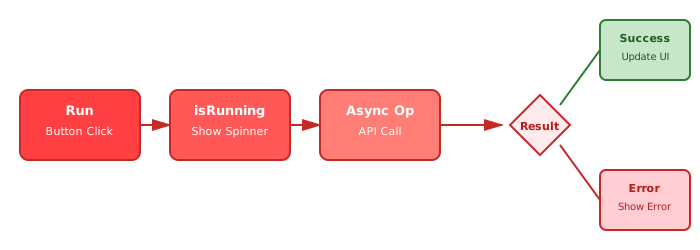
The core philosophy: Start commands with run() (fire and forget), then your app/UI observes and reacts to their state changes. This reactive pattern keeps your UI responsive with no blocking—you trigger the action and let your UI automatically respond to loading states, results, and errors.
Here's the simplest possible example using watch_it (the recommended approach):
class CounterService {
  int _count = 0;

  // Command wraps a function and acts as a ValueListenable
  late final incrementCommand = Command.createSyncNoParam<String>(
    () {
      _count++;
      return _count.toString();
    },
    initialValue: '0',
  );
}

// Register with get_it (call this in main())
void setup() {
  GetIt.instance.registerSingleton(CounterService());
}

// Use watch_it to observe the command
class CounterWidget extends WatchingWidget {
  const CounterWidget({super.key});

  @override
  Widget build(BuildContext context) {
    // Watch the command value - rebuilds when it changes
    final count = watchValue((CounterService s) => s.incrementCommand);

    return Column(
      mainAxisAlignment: MainAxisAlignment.center,
      children: [
        Text('You have pushed the button this many times:'),
        Text(
          count,
          style: Theme.of(context).textTheme.headlineMedium,
        ),
        SizedBox(height: 16),
        // No parameters - use .run as tearoff
        ElevatedButton(
          onPressed: GetIt.instance<CounterService>().incrementCommand.run,
          child: Text('Increment'),
        ),
      ],
    );
  }
}
Key points:
- Create with
Command.createSyncNoParam<TResult>()(see Command Types for different signatures) - Command has a
.runmethod - use it as tearoff foronPressed - Use
watchValueto observe the command - auto-rebuilds when the value changes - Register your service with
get_it(call setup inmain()), extendWatchingWidgetforwatch_itfunctionality - Initial value is required so the UI has something to show immediately
Using Commands without watch_it
Commands also work with plain ValueListenableBuilder if you prefer not to use watch_it. See Without watch_it for examples. For more about watch_it, see the watch_it documentation.
Real-World Example: Async Commands with Loading States
Most real apps need async operations (HTTP calls, database queries, etc.). Commands make this trivial by tracking execution state automatically. Here's an example with watch_it:
class WeatherService {
  late final loadWeatherCommand = Command.createAsync<String, String>(
    (city) async {
      await simulateDelay(1000);
      return 'Weather in $city: Sunny, 72°F';
    },
    initialValue: 'No data loaded',
  );
}

// Register service with get_it (call this in main())
void setup() {
  GetIt.instance.registerSingleton(WeatherService());
}

// Use watch_it to observe commands without ValueListenableBuilder
class WeatherWidget extends WatchingWidget {
  const WeatherWidget({super.key});

  @override
  Widget build(BuildContext context) {
    // Watch the command value directly
    final weather = watchValue((WeatherService s) => s.loadWeatherCommand);

    // Watch the loading state
    final isLoading =
        watchValue((WeatherService s) => s.loadWeatherCommand.isRunning);

    return Column(
      mainAxisAlignment: MainAxisAlignment.center,
      children: [
        if (isLoading)
          CircularProgressIndicator()
        else
          Text(weather, style: TextStyle(fontSize: 18)),
        SizedBox(height: 16),
        // With parameters - call command directly (it's callable)
        ElevatedButton(
          onPressed: () =>
              GetIt.instance<WeatherService>().loadWeatherCommand('London'),
          child: Text('Load Weather'),
        ),
      ],
    );
  }
}
What's happening:
Command.createAsync<TParam, TResult>()wraps an async functionwatchValueobserves both the command result AND itsisRunningproperty- The UI automatically shows a loading indicator while the command executes
- No nested
ValueListenableBuilderwidgets -watch_itkeeps the code clean - The command parameter (
'London') is passed to the wrapped function
This pattern eliminates the boilerplate of manually tracking loading states and nested builders → commands + watch_it handle everything for you.
Commands Always Notify (By Default)
Commands notify listeners on every execution, even if the result value is identical. This is intentional because:
- User actions need feedback - When clicking "Refresh", users expect loading indicators even if data hasn't changed
- State changes during execution -
isRunning,CommandResult, and error states update during the async operation - The action matters, not just the result - The command executed (API called, file saved), which is important regardless of return value
When to use notifyOnlyWhenValueChanges: true:
- Pure computation commands where only the result matters
- High-frequency updates where identical results should be ignored
- Performance optimization when listeners are expensive
For most real-world scenarios with user actions and async operations, the default behavior is what you want.
Key Concepts at a Glance
command_it offers powerful features for production apps:
Command Properties
The command itself is a ValueListenable<TResult> that publishes the result. Commands also expose additional observable properties:
value- Property getter for the current result (not a ValueListenable, just the value)isRunning-ValueListenable<bool>indicating if the command is currently executing (async commands only)canRun-ValueListenable<bool>combining!isRunning && !restriction(see restrictions below)errors-ValueListenable<CommandError?>of execution errors
See Command Properties for details.
CommandResult
Instead of watching multiple properties separately, use results to get comprehensive state:
command.results // ValueListenable<CommandResult<TParam, TResult>>CommandResult combines data, error, isRunning, and paramData in one object. Perfect for comprehensive error/loading/success UI states.
See Command Results for details.
Progress Control
Track operation progress, display status messages, and allow cancellation with the built-in Progress Control feature:
final uploadCommand = Command.createAsyncWithProgress<File, String>(
  (file, handle) async {
    for (int i = 0; i <= 100; i += 10) {
      if (handle.isCanceled.value) return 'Canceled';

      await uploadChunk(file, i);
      handle.updateProgress(i / 100.0);
      handle.updateStatusMessage('Uploading: $i%');
    }
    return 'Complete';
  },
  initialValue: '',
);// In UI:
watchValue((MyService s) => s.uploadCommand.progress) // 0.0 to 1.0
watchValue((MyService s) => s.uploadCommand.statusMessage) // Status text
uploadCommand.cancel() // Request cancellationAll commands expose progress properties (even without WithProgress factory) - commands without progress simply return default values with zero overhead.
See Progress Control for details.
Error Handling
Commands capture exceptions automatically and publish them via the errors property. You can use listen_it operators to filter and handle specific error types:
command.errors.where((error) => error?.error is NetworkError).listen((error, _) {
  showSnackbar('Network error: ${error!.error.message}');
});
For advanced scenarios, use error filters to route different error types at the command level. See Error Handling for details.
Restrictions
Control when a command can execute by passing a ValueListenable<bool> restriction:
final isOnline = ValueNotifier(true);

final command = Command.createAsync(
  fetchData,
  initialValue: [],
  restriction: isOnline, // Command only runs when isOnline.value == true
);
Because it's a ValueNotifier passed to the constructor, a command can be enabled and disabled at any time by changing the notifier's value.
See Restrictions for details.
Next Steps
Choose your learning path based on your goal:
📚 I want to learn the fundamentals
Start with Command Basics to understand:
- All command factory methods (sync/async, with/without parameters)
- How to run commands programmatically vs. with UI triggers
- Return values and initial values
⚡ I want to build a real feature
Follow the Weather App Tutorial to build a complete feature:
- Async commands with real API calls
- Debouncing user input
- Loading states and error handling
- Command restrictions
- Multiple commands working together
🛡️ I need robust error handling
Check out Error Handling:
- Capturing and displaying errors
- Routing different error types to different handlers
- Retry logic and fallback strategies
🎯 I want production-ready patterns
See Best Practices for:
- When to use commands vs. other patterns
- Avoiding common pitfalls
- Performance optimization
- Architecture recommendations
🧪 I need to write tests
Head to Testing for:
- Unit testing commands in isolation
- Widget testing with commands
- Mocking command responses
- Testing error scenarios
Quick Reference
| Topic | Link |
|---|---|
| Creating commands (all factory methods) | Command Basics |
| Command types (signatures) | Command Types |
| Observable properties (value, isRunning, etc.) | Command Properties |
| CommandResult (comprehensive state) | Command Results |
| CommandBuilder widget | Command Builders |
| Error handling and routing | Error Handling |
| Conditional execution | Restrictions |
| Testing patterns | Testing |
Integration with watch_it | Observing Commands with watch_it |
| Production patterns | Best Practices |
Ready to dive deeper? Pick a topic from the Quick Reference above or follow one of the Next Steps learning paths!