
Getting Started
🤖 AI-Assisted Development
get_it ships with AI skill files in its skills/ directory. They help AI coding assistants generate correct get_it code. Learn more →
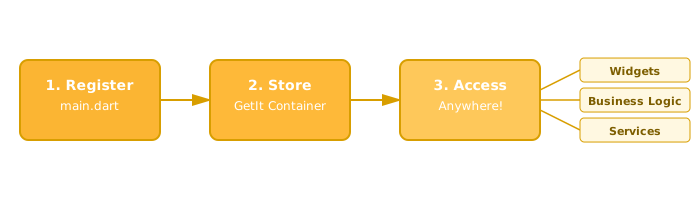
get_it is a simple, fast service locator for Dart and Flutter that allows you to access any object that you register from anywhere in your app without needing BuildContext or complex widget trees.
Key benefits:
- ✅ Extremely fast - O(1) lookup using Dart's Map
- ✅ Easy to test - Switch implementations for mocks in tests
- ✅ No BuildContext needed - Access from anywhere in your app (UI, business logic, anywhere)
- ✅ Type safe - Compile-time type checking
- ✅ No code generation - Works without build_runner
Common use cases:
- Access services like API clients, databases, or authentication from anywhere
- Manage app-wide state (view models, managers, BLoCs)
- Easily swap implementations for testing
Join our support Discord server: https://discord.com/invite/Nn6GkYjzW
Installation
Add get_it to your pubspec.yaml:
dependencies:
  get_it: ^8.3.0  # Check pub.dev for latest version
Quick Example
Step 1: Create a global GetIt instance (typically in a separate file):
final getIt = GetIt.instance;

void configureDependencies() {
  // Register your services
  getIt.registerSingleton<ApiClient>(ApiClient());
  getIt.registerSingleton<Database>(Database());
  getIt.registerSingleton<AuthService>(AuthService());
}
Step 2: Call your configuration function before runApp():
configureDependencies(); // Register all services FIRST
runApp(MyApp());
Step 3: Access your services from anywhere:
class LoginPage extends StatelessWidget {
  @override
  Widget build(BuildContext context) {
    return ElevatedButton(
      onPressed: () async {
        // Access service from anywhere - no BuildContext needed!
        await getIt<AuthService>().login('user@example.com', 'password');
      },
      child: Text('Login'),
    );
  }
}
That's it! No Provider wrappers, no InheritedWidgets, no BuildContext needed.
Naming Your GetIt Instance
The standard pattern is to create a global variable:
final getIt = GetIt.instance;Alternative names you might see:
final sl = GetIt.instance;(service locator)final locator = GetIt.instance;final di = GetIt.instance;(dependency injection)GetIt.instanceorGetIt.I(use directly without variable)
Recommendation: Use getIt or di - both are clear and widely recognized in the Flutter community.
Using with watch_it
If you're using the watch_it package, you already have a global di instance available - no need to create your own. Just import watch_it and use di directly.
Cross-Package Usage
GetIt.instance returns the same singleton across all packages in your project. Create your global variable once in your main app and import it elsewhere.
Isolate Safety
GetIt instances are not thread-safe and cannot be shared across isolates. Each isolate will get its own GetIt instance. This means objects registered in one isolate can't be accessed from another isolate.
When to Use Which Registration Type
get_it offers three main registration types:
| Registration Type | When Created | Lifetime | Use When |
|---|---|---|---|
| registerSingleton | Immediately | Permanent | Service needed at startup, fast to create |
| registerLazySingleton | First access | Permanent | Service not always needed, expensive to create |
| registerFactory | Every get() call | Temporary | Need new instance each time (dialogs, temp objects) |
Examples:
void configureDependencies() {
  // Singleton - created immediately, used for entire app lifetime
  getIt.registerSingleton<Logger>(Logger());

  // LazySingleton - created on first use, used for entire app lifetime
  getIt.registerLazySingleton<Database>(() => Database());
  getIt.registerLazySingleton<ApiClient>(() => ApiClient());

  // Factory - new instance every time you call getIt<ShoppingCart>()
  getIt.registerFactory<ShoppingCart>(() => ShoppingCart());
}
Best practice: Use registerSingleton() if your object will be used anyway and doesn't require significant resources to create - it's the simplest approach. Only use registerLazySingleton() when you need to delay expensive initialization or for services not always needed.
Accessing Services
The generic type parameter you provide when registering is that one that is used when you access an object after it is registered. If you don't provide that, Dart will infer it from the implementation type:
Get your registered services using getIt<Type>():
void accessServices() {
  // Shorthand syntax (recommended)
  final api = getIt<ApiClient>();

  // Full syntax (same result)
  final db = getIt.get<Database>();

  // The <Type> parameter must match what was registered
  // This works because we registered <ApiClient>:
  final client = getIt<ApiClient>(); // ✅ Works

  // This would fail if ApiClient was registered as a concrete type:
  // final client = getIt<SomeInterface>(); // ❌ Error if not registered as SomeInterface
}
Shorthand Syntax
getIt<Type>() is shorthand for getIt.get<Type>(). Both work the same - use whichever you prefer!
Registering Concrete Classes vs Interfaces
Most of the time, register your concrete classes directly:
void configureDependencies() {
  getIt.registerSingleton<ApiClient>(ApiClient());
  getIt.registerSingleton<UserRepository>(UserRepository());
}

// Access directly
final api = getIt<ApiClient>();
This is simpler and makes IDE navigation to implementation easier.
Only use abstract interfaces when you expect multiple implementations:
// Use interface when you have multiple versions
abstract class PaymentProcessor {
  Future<void> processPayment(double amount);
}

class StripePaymentProcessor implements PaymentProcessor {
  @override
  Future<void> processPayment(double amount) async {}
}

class PayPalPaymentProcessor implements PaymentProcessor {
  @override
  Future<void> processPayment(double amount) async {}
}

// Register by interface
void configureDependencies() {
  getIt.registerSingleton<PaymentProcessor>(StripePaymentProcessor());
}
When to use interfaces:
- ✅ Multiple implementations (production vs test, different providers)
- ✅ Platform-specific implementations (mobile vs web)
- ✅ Feature flags to switch implementations
- ❌️ Don't use "just because" - creates navigation friction in your IDE
// Without type parameter - Dart infers StripePaymentProcessor
getIt.registerSingleton(StripePaymentProcessor());
getIt<PaymentProcessor>(); // ❌️ Error - not registered as PaymentProcessor

// With type parameter - explicitly register as PaymentProcessor
getIt.registerSingleton<PaymentProcessor>(StripePaymentProcessor());
getIt<PaymentProcessor>(); // ✅ Works - registered as PaymentProcessor
Switching Implementations
A common pattern is switching between real and mock implementations using conditional registration:
// Interface
abstract class PaymentProcessor {
  Future<void> processPayment(double amount);
}

// Real implementation
class StripePaymentProcessor implements PaymentProcessor {
  @override
  Future<void> processPayment(double amount) async {
    // Real Stripe API call
  }
}

// Mock implementation for testing
class MockPaymentProcessor implements PaymentProcessor {
  @override
  Future<void> processPayment(double amount) async {
    // Mock - no real API call
  }
}

// Configure with conditional registration
void configureDependencies({bool isTesting = false}) {
  if (isTesting) {
    // Register mock for testing
    getIt.registerSingleton<PaymentProcessor>(MockPaymentProcessor());
  } else {
    // Register real implementation for production
    getIt.registerSingleton<PaymentProcessor>(StripePaymentProcessor());
  }
}

// Business logic - works with either implementation!
class CheckoutService {
  Future<void> processOrder(double amount) {
    // The <PaymentProcessor> type parameter is what enables the switch
    // Without it, mock and real would register as different types
    final processor = getIt<PaymentProcessor>();
    return processor.processPayment(amount);
  }
}
Because both implementations are registered as <PaymentProcessor>, the rest of your code remains unchanged - it always requests getIt<PaymentProcessor>() regardless of which implementation is registered.
Organizing Your Setup Code
For larger apps, split registration into logical groups:
void configureDependencies() {
  _registerCoreServices();
  _registerDataServices();
  _registerBusinessLogic();
}

void _registerCoreServices() {
  getIt.registerLazySingleton<Logger>(() => Logger());
  getIt.registerLazySingleton<Analytics>(() => Analytics());
}

void _registerDataServices() {
  getIt.registerLazySingleton<ApiClient>(() => ApiClient());
  getIt.registerLazySingleton<Database>(() => Database());
}

void _registerBusinessLogic() {
  getIt.registerLazySingleton<AuthService>(() => AuthService(getIt()));
  getIt.registerLazySingleton<UserRepository>(
      () => UserRepository(getIt(), getIt()));
}
See Where should I put my get_it setup code? for more patterns.
Want Less Boilerplate? Try Injectable!
Injectable is a code generation package that automates your get_it setup. If you find yourself writing lots of registration code, injectable might be for you.
How It Works
Instead of manually registering each service:
void configureDependencies() {
  getIt.registerLazySingleton<ApiClient>(() => ApiClient());
  getIt.registerLazySingleton<Database>(() => Database());
  getIt.registerLazySingleton<AuthService>(() => AuthService(getIt(), getIt()));
}
Just annotate your classes:
@lazySingleton
class ApiClient { }

@lazySingleton
class Database { }

@lazySingleton
class AuthService {
  AuthService(ApiClient api, Database db); // Auto-injected!
}
Run build_runner and injectable generates all the registration code for you.
Quick Setup
- Add dependencies:
dependencies:
  get_it: ^8.3.0
  injectable: ^2.3.2

dev_dependencies:
  injectable_generator: ^2.6.1
build_runner: ^2.4.0- Annotate your main configuration:
@InjectableInit()
void configureDependencies() => getIt.init();- Run code generation:
flutter pub run build_runner buildWhen to Use Injectable
Use injectable if:
- You have many services to register
- You want automatic dependency resolution
- You prefer annotations over manual setup
- You're comfortable with code generation
Stick with plain get_it if:
- You prefer explicit, visible registration
- You want to avoid build_runner in your workflow
- You have a small number of services
- You want full control over registration order and logic
Both approaches use the same GetIt instance and have identical runtime performance!
Learn More
Check out injectable on pub.dev for full documentation and advanced features like:
- Environment-specific registrations (dev/prod)
- Pre-resolved dependencies
- Module registration
- Custom annotations
Injectable Support
Injectable is a separate package maintained by a different author. If you encounter issues with injectable, please file them on the injectable GitHub repository.
Next Steps
Now that you understand the basics, explore these topics:
Core Concepts:
- Object Registration - All registration types in detail
- Scopes - Manage service lifetime for login/logout, features
- Async Objects - Handle services with async initialization
- Testing - Test your code that uses get_it
Advanced Features:
- Multiple Registrations - Plugin systems, observers, middleware
- Advanced Patterns - Named instances, reference counting, utilities
Help:
Why get_it?
Click to learn about the motivation behind get_it
As your app grows, you need to separate business logic from UI code. This makes your code easier to test and maintain. But how do you access these services from your widgets?
Traditional approaches and their limitations:
InheritedWidget / Provider:
- ❌️ Requires `BuildContext` (not available in business layer)
- ❌️ Adds complexity to widget tree
- ❌️ Hard to access from background tasks, isolates
Plain Singletons:
- ❌️ Can't swap implementation for tests
- ❌️ Tight coupling to concrete classes
- ❌️ No lifecycle management
IoC/DI Containers:
- ❌️ Slow startup (reflection-based)
- ❌️ "Magic" - hard to understand where objects come from
- ❌️ Most don't work with Flutter (no reflection)
get_it solves these problems:
- ✅ Access from anywhere without BuildContext
- ✅ Easy to mock for tests (register interface, swap implementation)
- ✅ Extremely fast (no reflection, just Map lookup)
- ✅ Clear and explicit (you see exactly what's registered)
- ✅ Lifecycle management (scopes, disposal)
- ✅ Works in pure Dart and Flutter
Service Locator pattern:
get_it implements the Service Locator pattern - it decouples interface (abstract class) from concrete implementation while allowing access from anywhere.
For deeper understanding, read Martin Fowler's classic article: Inversion of Control Containers and the Dependency Injection pattern