Scopes
Scopes provide hierarchical lifecycle management for your business objects, independent of the widget tree.
get_it Scopes vs Widget-Tree Scoping (Provider, InheritedWidget)
get_it scopes are intentionally independent of the widget tree. They manage the lifecycle of business objects based on application state (login/logout, sessions, features), not widget position.
For widget-lifetime scoping, use watch_it's pushScope which automatically pushes a get_it scope for the lifetime of a widget.
What Are Scopes?
Think of scopes as a stack of registration layers. When you register a type in a new scope, it shadows (hides) any registration of the same type in lower scopes. Popping a scope automatically restores the previous registrations and cleans up resources.
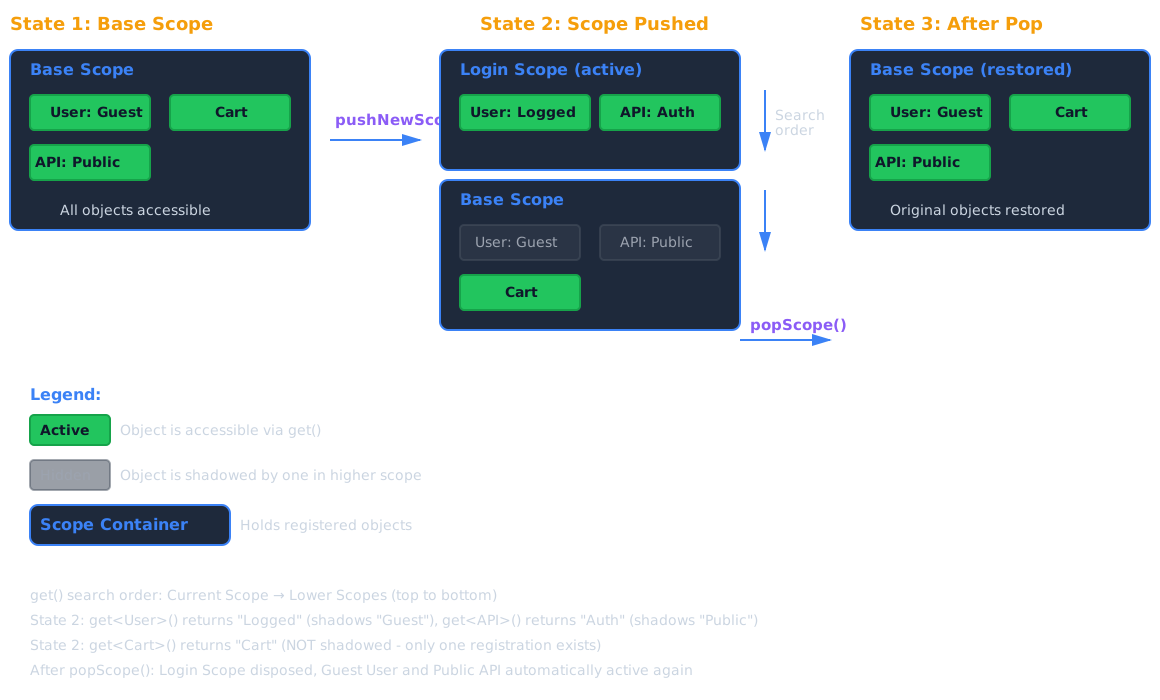
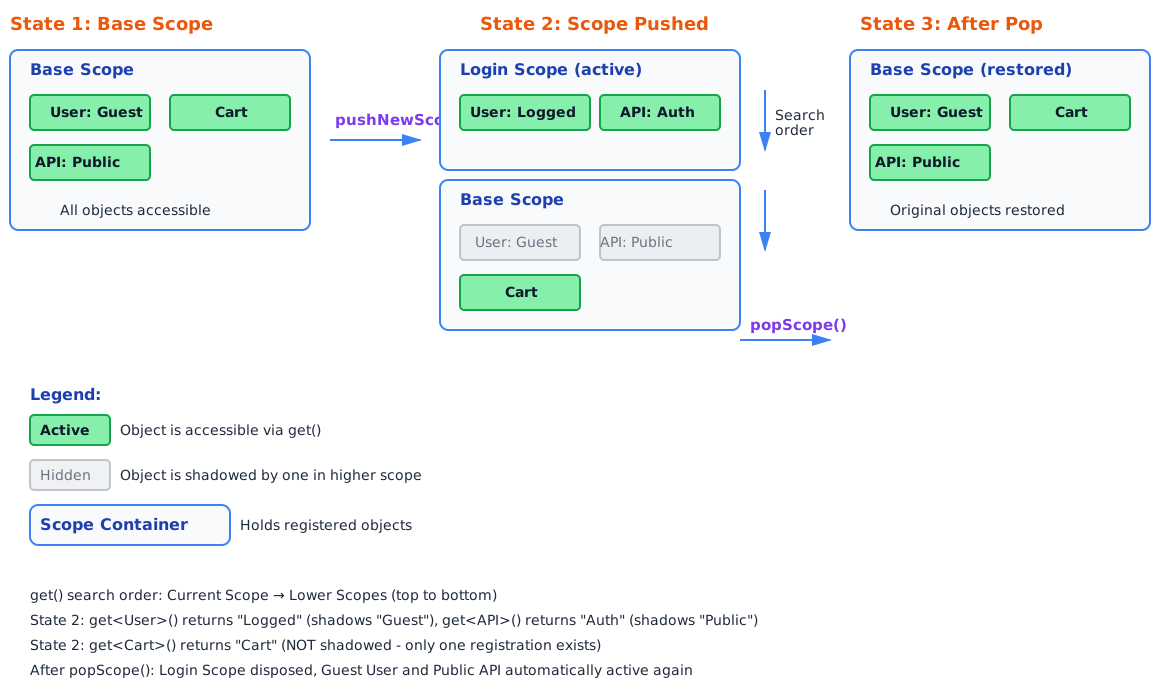
How Shadowing Works
// Base scope
getIt.registerSingleton<User>(GuestUser());

// Push new scope
getIt.pushNewScope(scopeName: 'logged-in');
getIt.registerSingleton<User>(LoggedInUser());

getIt<User>(); // Returns LoggedInUser (shadows GuestUser)

// Pop scope
await getIt.popScope();

getIt<User>(); // Returns GuestUser (automatically restored)
The search order is top to bottom - get_it always returns the first match starting from the current scope.
When to Use Scopes
✅ Perfect Use Cases
1. Authentication States
void main() async {
  final token = 'auth_token_123';
  final user = GuestUser();

  // App startup - guest mode
  getIt.registerSingleton<User>(GuestUser());
  getIt.registerSingleton<Permissions>(GuestPermissions());

  // User logs in
  getIt.pushNewScope(scopeName: 'authenticated');
  getIt.registerSingleton<User>(AuthenticatedUser(token));
  getIt.registerSingleton<Permissions>(UserPermissions(user));

  // User logs out - automatic cleanup
  await getIt.popScope(); // GuestUser & GuestPermissions restored
}
2. Session Management
// Start new shopping session
getIt.pushNewScope(scopeName: 'session');
getIt.registerSingleton<ShoppingCart>(ShoppingCart());
getIt.registerSingleton<SessionAnalytics>(SessionAnalytics());

// End session - cart discarded, analytics sent
await getIt.popScope();
3. Feature Flags / A-B Testing
const featureFlagEnabled = true;

// Setup base scope with original checkout
final userService = await UserService.load();
getIt.registerSingleton<CheckoutService>(CheckoutService(userService));

if (featureFlagEnabled) {
  getIt.pushNewScope(scopeName: 'feature-new-checkout');
  getIt.registerSingleton<CheckoutService>(NewCheckoutService(userService));
} else {
  // Uses base scope's original CheckoutService
}
4. Test Isolation
setUp(() {
  configureDependencies(); // Call your real DI setup

  getIt.pushNewScope(); // Shadow specific services with mocks
  getIt.registerSingleton<ApiClient>(MockApiClient());
  getIt.registerSingleton<Database>(MockDatabase());
});

tearDown(() async {
  await getIt.popScope(); // Remove mocks, clean slate for next test
});
Creating and Managing Scopes
Basic Scope Operations
// Push a new scope
  getIt.pushNewScope(
    scopeName: 'my-scope', // Optional: name for later reference
    init: (getIt) {
      // Register objects immediately
      getIt.registerSingleton<Service>(ServiceImpl());
    },
    dispose: () {
      // Cleanup when scope pops (called before object disposal)
      print('Scope cleanup');
    },
  );

// Pop the current scope
  await getIt.popScope();

// Pop multiple scopes to a named one
  await getIt.popScopesTill('my-scope', inclusive: true);

// Drop a specific scope by name (without popping above it)
  await getIt.dropScope('my-scope');

// Check if a scope exists
  if (getIt.hasScope('session')) {
    // ...
  }

// Get current scope name
  print(getIt
      .currentScopeName); // Returns null for base scope, 'baseScope' for base
Async Scope Initialization
When scope setup requires async operations (loading config files, establishing connections):
const tenantId = 'tenant-123';

await getIt.pushNewScopeAsync(
  scopeName: 'tenant-workspace',
  init: (getIt) async {
    // Load tenant configuration from file/database
    final config = await loadTenantConfig(tenantId);
    getIt.registerSingleton<TenantConfig>(config);

    // Establish database connection
    final dbConnection = DatabaseConnection();
    await dbConnection.connect();
    getIt.registerSingleton<DatabaseConnection>(dbConnection);

    // Load cached data
    final cache = CacheManager();
    await cache.initialize(tenantId);
    getIt.registerSingleton<CacheManager>(cache);
  },
  dispose: () async {
    // Close connections
    await getIt<DatabaseConnection>().close();
    await getIt<CacheManager>().flush();
  },
);
Async Dependencies Between Services
For services with async initialization that depend on each other, use registerSingletonAsync with the dependsOn parameter instead. See Async Objects documentation for details.
Advanced Scope Features
Final Scopes (Preventing Accidental Registrations)
Prevent race conditions by locking a scope after initialization:
  getIt.pushNewScope(
    isFinal: true, // Can't register after init completes
    init: (getIt) {
      // MUST register everything here
      getIt.registerSingleton<ServiceA>(ServiceA());
      getIt.registerSingleton<ServiceB>(ServiceB());
    },
  );

// This throws an error - scope is final!
// getIt.registerSingleton<ServiceC>(ServiceC());
Use when:
- Building plugin systems where scope setup must be atomic
- Preventing accidental registration after scope initialization
Shadow Change Handlers
Objects can be notified when they're shadowed or restored:
class StreamingService implements ShadowChangeHandlers {
  StreamSubscription? _subscription;
  final Stream<dynamic> dataStream = Stream.empty();

  void init() {
    _subscription = dataStream.listen(_handleData);
  }

  void _handleData(dynamic data) {
    // Handle data
  }

  @override
  void onGetShadowed(Object shadowingObject) {
    // Another StreamingService is now active - pause our work
    _subscription?.pause();
    print('Paused: $shadowingObject is now handling streams');
  }

  @override
  void onLeaveShadow(Object shadowingObject) {
    // We're active again - resume work
    _subscription?.resume();
    print('Resumed: $shadowingObject was removed');
  }
}
Use cases:
- Resource-heavy services that should pause when inactive
- Services with subscriptions that need cleanup/restoration
- Preventing duplicate background work
Scope Change Notifications
Get notified when any scope change occurs:
getIt.onScopeChanged = (bool pushed) {
  if (pushed) {
    print('New scope pushed - UI might need rebuild');
  } else {
    print('Scope popped - UI might need rebuild');
  }
};
Note: watch_it automatically handles UI rebuilds on scope changes via rebuildOnScopeChanges.
Scope Lifecycle & Disposal
Disposal Order
When a scope is popped:
- Scope dispose function is called (if provided)
- Object dispose functions are called in reverse registration order
- Scope is removed from the stack
void main() async {
  // Get service from scope
  final service = getIt<MyServiceImpl>();
  service.doWork();
  service.saveState();

  // When exiting scope, call cleanup
  await getIt.popScope();

  // Scope is now disposed, service is unregistered
  // Next access will get service from parent scope (if any)
  final parentScopeService = getIt<MyServiceImpl>();
}
Implementing Disposable Interface
Instead of passing dispose functions, implement Disposable:
class MyService implements Disposable {
  final Stream<dynamic> stream = Stream.empty();
  StreamSubscription? _subscription;

  void init() {
    _subscription = stream.listen((data) {});
  }

  @override
  Future<void> onDispose() async {
    await _subscription?.cancel();
    // Cleanup resources
  }
}

void setup() {
  // Automatically calls onDispose when scope pops or object is unregistered
  getIt.registerSingleton<MyService>(MyService()..init());
}
Reset vs Pop
// resetScope - clears all registrations in current scope but keeps scope
await getIt.resetScope(dispose: true);

// popScope - removes entire scope and restores previous
await getIt.popScope();
Common Patterns
Login/Logout Flow
class AuthService {
  Future<void> login(String username, String password) async {
    final user = await getIt<ApiClient>().login(username, password);

    // Push authenticated scope
    getIt.pushNewScope(scopeName: 'authenticated');
    getIt.registerSingleton<User>(user);
    getIt.registerSingleton<ApiClient>(AuthenticatedApiClient(user.token));
    getIt.registerSingleton<NotificationService>(NotificationService(user.id));
  }

  Future<void> logout() async {
    // Pop scope - automatic cleanup of all authenticated services
    await getIt.popScope();

    // GuestUser (from base scope) is now active again
  }
}
Multi-Tenant Applications
class TenantManager {
  Future<void> switchTenant(String tenantId) async {
    // Pop previous tenant scope if exists
    if (getIt.hasScope('tenant')) {
      await getIt.popScope();
    }

    // Load new tenant
    await getIt.pushNewScopeAsync(
      scopeName: 'tenant',
      init: (getIt) async {
        final config = await loadTenantConfig(tenantId);
        getIt.registerSingleton<TenantConfig>(config);

        final database = await openTenantDatabase(tenantId);
        getIt.registerSingleton<Database>(database);

        final api = ApiClient(config.apiUrl);
        getIt.registerSingleton<TenantServices>(
          TenantServices(database, api),
        );
      },
    );
  }

  Future<TenantConfig> loadTenantConfig(String tenantId) async {
    await Future.delayed(const Duration(milliseconds: 10));
    return TenantConfig('tenant_db', 'api_key_123');
  }
}

Future<Database> openTenantDatabase(String tenantId) async {
  await Future.delayed(const Duration(milliseconds: 10));
  return Database();
}
Feature Toggles with Scopes
class FeatureManager {
  final Map<String, bool> _activeFeatures = {};

  void enableFeature(String featureName, FeatureImplementation impl) {
    if (_activeFeatures[featureName] == true) return;

    getIt.pushNewScope(scopeName: 'feature-$featureName');
    impl.register(getIt);
    _activeFeatures[featureName] = true;
  }

  Future<void> disableFeature(String featureName) async {
    if (_activeFeatures[featureName] != true) return;

    await getIt.dropScope('feature-$featureName');
    _activeFeatures[featureName] = false;
  }
}
Testing with Scopes
Use scopes to shadow real services with mocks while keeping the rest of your DI setup:
group('UserService Tests', () {
  setUp(() {
    // Call your app's real DI initialization
    configureDependencies();

    // Push scope to shadow specific services with test doubles
    getIt.pushNewScope();
    getIt.registerSingleton<ApiClient>(MockApiClient());
    getIt.registerSingleton<Database>(MockDatabase());

    // UserService uses real implementation but gets mock dependencies
  });

  tearDown(() async {
    // Pop scope - removes mocks, restores real services
    await getIt.popScope();
  });

  test('should load user data', () async {
    // UserService gets MockApiClient and MockDatabase automatically
    final service = getIt<UserService>();
    print('service: $service');
    final user = await service.loadUser('123');
    expect(user.id, '123');
  });
});
Benefits:
- No need to duplicate all registrations in tests
- Only mock what's necessary (ApiClient, Database)
- Other services use real implementations
- Automatic cleanup via popScope()
Debugging Scopes
Check Current Scope
  print('Current scope: ${getIt.currentScopeName}');
// Output: null (for unnamed scopes), 'session', 'baseScope', etc.
Check Registration Scope
final registration = getIt.findFirstObjectRegistration<MyService>();
print('registration: $registration');
print('Registered in scope: ${registration?.instanceName}');
Verify Scope Exists
if (getIt.hasScope('authenticated')) {
  // Scope exists
} else {
  // Not logged in
}
Best Practices
✅ Do
- Name your scopes for easier debugging and management
- Use init parameter to register objects immediately when pushing scope
- Always await popScope() to ensure proper cleanup
- Implement Disposable for automatic cleanup instead of passing dispose functions
- Use scopes for business logic lifecycle, not UI state
❌️ Don't
- Don't use scopes for temporary state - use parameters or variables instead
- Don't forget to pop scopes - memory leaks if scopes accumulate
- Don't rely on scope order for logic - use explicit dependencies
- Don't push scopes inside build methods - use
watch_it'spushScopefor widget-bound scopes
Widget-Bound Scopes with watch_it
For scopes tied to widget lifetime, use watch_it:
class UserProfilePage extends WatchingWidget {
  final String userId;

  const UserProfilePage({super.key, required this.userId});

  @override
  Widget build(BuildContext context) {
    // Automatically pushes scope when widget mounts
    // Automatically pops scope when widget disposes
    pushScope(init: (getIt) {
      getIt.registerSingleton<ProfileController>(
        ProfileController(userId: userId),
      );
    });

    final controller = watchIt<ProfileController>();

    return Scaffold(
      body: Text(controller.userData.name),
    );
  }
}
See watch_it documentation for details.
API Reference
Scope Management
| Method | Description |
|---|---|
pushNewScope({init, scopeName, dispose, isFinal}) | Push a new scope with optional immediate registration |
pushNewScopeAsync({init, scopeName, dispose}) | Push scope with async initialization |
popScope() | Pop current scope and dispose objects |
popScopesTill(name, {inclusive}) | Pop all scopes until named scope |
dropScope(scopeName) | Drop specific scope by name |
resetScope({dispose}) | Clear current scope registrations |
hasScope(scopeName) | Check if scope exists |
currentScopeName | Get current scope name (getter) |
Scope Callbacks
| Property | Description |
|---|---|
onScopeChanged | Called when scope pushed/popped |
Object Lifecycle
| Interface | Description |
|---|---|
ShadowChangeHandlers | Implement to get notified when shadowed |
Disposable | Implement for automatic cleanup |
See Also
- Object Registration - How to register objects
- Async Objects - Working with async initialization
- Testing - Using scopes in tests
watch_itpushScope - Widget-bound scoping