What to do with which package?
flutter_it is a construction set - each package solves a specific problem. Use one, combine several, or use them all together. This guide helps you choose the right tools for your needs.
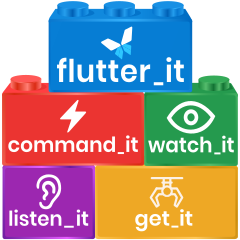
Quick Decision Guide
| You need to... | Use this package |
|---|---|
| Access services/dependencies anywhere in your app | get_it |
| Update UI automatically when data changes | watch_it + get_it |
| Handle async actions with loading/error states | command_it |
| Transform, combine reactive data or use observable collections | listen_it |
Why these packages?
Good Flutter architecture follows key principles: separation of concerns, single source of truth, and testability. The flutter_it packages help you implement these principles without the complexity of traditional frameworks.
💡 New to Flutter architecture? Jump to detailed architecture principles to understand the foundation.


The Problems Each Package Solves
 get_it - Access anything, anywhere
Problem: How do I access services, business logic, and shared data without passing it through the widget tree?
Solution: Service locator pattern - register once, access anywhere without BuildContext.
Use when:
- You need dependency injection without the widget tree
- You want to share services across your app
- You need control over object lifecycle (singletons, factories, scopes)
- You want to test your business logic independently
Example use case: Accessing an API service from anywhere in your app.


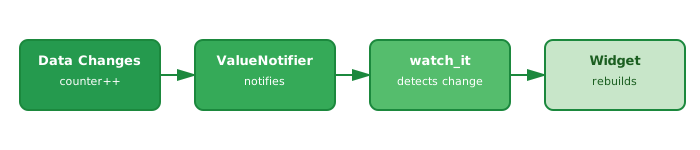
watch_it - Reactive UI updates
Problem: How do I update my UI when data changes without setState() or complex state management?
Solution: Watch ValueListenable/ChangeNotifier and rebuild automatically - you'll almost never need StatefulWidget again.
Use when:
- You want automatic UI updates on data changes
- You want to eliminate StatefulWidget and setState() boilerplate
- You need fine-grained rebuilds (only affected widgets)
- You're tired of manually managing subscriptions
Example use case: A counter widget that rebuilds when the count changes.
Requires: get_it for service location
 command_it - Smart action encapsulation
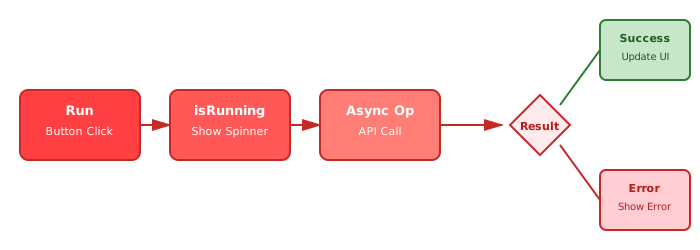
Problem: How do I handle async operations with loading states, errors, and enable/disable logic without repetitive boilerplate?
Solution: Command pattern with built-in state management - handle exceptions the smart way.
Use when:
- You have async operations (API calls, database operations)
- You need loading indicators and error handling
- You want to enable/disable actions based on conditions
- You want reusable, testable action logic
Example use case: A save button that shows loading state, handles errors, and can be disabled.
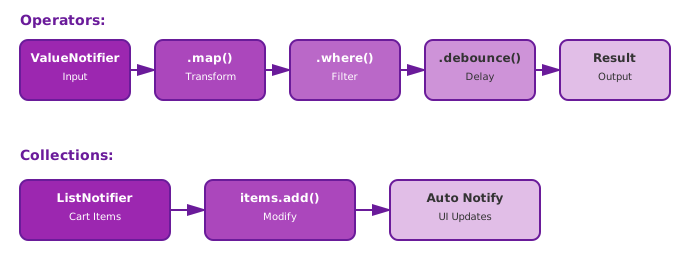
 listen_it - Reactive primitives
Problem: How do I transform, combine, filter reactive data? How do I make collections observable?
Solution: RxDart-like operators for ValueNotifier that are easy to understand, plus reactive collections (ListNotifier, MapNotifier, SetNotifier).
Use when:
- You need to transform ValueListenable data (map, where, debounce)
- You need to combine multiple ValueListenables into one
- You want observable Lists, Maps, or Sets that notify on changes
- You need reactive data pipelines without RxDart complexity
Example use case: Debouncing search input, or a shopping cart that notifies on item changes.
Common Package Combinations
Minimal Setup: get_it + watch_it
Perfect for apps that need dependency injection and reactive UI. Covers 90% of typical app needs.
Example: Most CRUD apps, dashboard apps, form-heavy apps.
Full Stack: All 4 packages
Complete reactive architecture with dependency injection, reactive UI, command pattern, and data transformations.
Example: Complex apps with API integration, real-time updates, and sophisticated state transformations.
Standalone Use Cases
Each package works independently:
- Just get_it: Simple dependency injection without reactivity
- Just listen_it: Reactive operators/collections without dependency injection
- Just command_it: Command pattern for encapsulating actions
Architecture Principles
Why separate your code into layers?
flutter_it packages enable clean architecture by solving specific problems that arise when you separate concerns:
The Goal: Keep business logic separate from UI, maintain a single source of truth, make everything testable.
The Challenge: Once you move data out of widgets, you need:
- A way to access that data from anywhere → get_it solves this
- A way to update UI when data changes →
watch_itsolves this - A way to handle async operations cleanly → command_it solves this
- A way to transform and combine reactive data → listen_it solves this
Separation of concerns
Different parts of your application should have different responsibilities:
- UI layer: Displays data and handles user interactions
- Business logic layer: Processes data and implements app rules
- Services layer: Communicates with external systems (APIs, databases, device features)
By separating these layers, you can:
- Change one part without affecting others
- Test business logic without UI
- Reuse logic across different screens
Single source of truth
Each piece of data should live in exactly one place. If you have a list of users, there should be one list, not multiple copies across different widgets.
Benefits:
- Data stays consistent across your app
- Updates happen in one place
- Easier to debug and maintain
Testability
Your app should be designed for easy testing:
- Business logic can be tested without Flutter widgets
- Services can be mocked for unit tests
- UI can be tested independently with test data
For a comprehensive discussion, see Practical Flutter Architecture.
Next Steps
Ready to start? Pick your first package:
- Get started with get_it →
- Get started with watch_it →
- Get started with command_it →
- Get started with listen_it →
Not sure yet? Check out real-world examples to see the packages in action.