
Getting Started
🤖 AI-Assisted Development
watch_it ships with AI skill files in its skills/ directory. They teach AI tools critical rules like watch ordering. Learn more →
watch_it makes your Flutter widgets automatically rebuild when data changes. No setState, no StreamBuilder, just simple reactive programming built on top of get_it.
Key benefits:
- ✅ Automatic rebuilds - Widgets rebuild when data changes, no
setStateneeded - ✅ No manual listeners - Automatic subscription & cleanup, prevent memory leaks
- ✅ Simpler async - Replace
StreamBuilder/FutureBuilderwithwatchStream()/watchFuture() - ✅ Side effects - Navigation, dialogs, toasts without rebuilding
- ✅ Lifecycle helpers -
callOnce()for initialization,createOnce()for controllers - ✅ Command integration - Observe
command_itcommands reactively
Common use cases:
- Display live data from managers (todos, user profiles, settings) without
setState - Show real-time updates from streams (chat messages, notifications, sensor data)
- Navigate or show dialogs in response to data changes
- Display command progress (loading spinners, error messages, success states)
Join our support Discord server: https://discord.com/invite/Nn6GkYjzW
Installation
Add watch_it to your pubspec.yaml:
dependencies:
  watch_it: ^2.0.0
  get_it: ^8.0.0  # watch_it builds on get_it
Quick Example
Step 1: Register your reactive objects with get_it:
// 1. Create a manager with reactive state
class CounterManager {
  final count = ValueNotifier<int>(0);

  void increment() => count.value++;
}

// 2. Register it in get_it
void setupCounter() {
  di.registerSingleton<CounterManager>(CounterManager());
}

// 3. Watch it in your widget
class CounterWidget extends WatchingWidget {
  const CounterWidget({super.key});

  @override
  Widget build(BuildContext context) {
    // This one line makes it reactive!
    final count = watchValue((CounterManager m) => m.count);

    return Scaffold(
      body: Center(
        child: Text('Count: $count', style: TextStyle(fontSize: 48)),
      ),
      floatingActionButton: FloatingActionButton(
        onPressed: () => di<CounterManager>().increment(),
        child: Icon(Icons.add),
      ),
    );
  }
}
Step 2: Use WatchingWidget and watch your data:
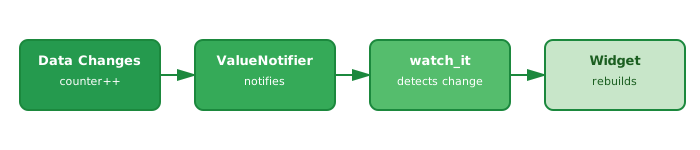
The widget automatically rebuilds when the counter value changes - no setState needed!
How it works:
WatchingWidget- LikeStatelessWidget, but with reactive superpowerswatchValue()- Watches data from get_it and rebuilds when it changes- Automatic subscriptions - No manual listeners, no cleanup needed
The widget automatically subscribes to changes when it builds and cleans up when disposed.
Adding to Existing Apps
Already have an app? Just add a mixin to your existing widgets:
class MyWidget extends StatelessWidget with WatchItMixin {
  const MyWidget({super.key});

  @override
  Widget build(BuildContext context) {
    final data = watchValue((DataManager m) => m.data);
    return Text('$data');
  }
}
No need to change your widget hierarchy - just add with WatchItMixin and start using watch functions.
What's Next?
Now that you've seen the basics, there's so much more watch_it can do:
→ Your First Watch Functions - Deep dive into watchValue() and other watch functions
→ WatchingWidgets - Learn which widget type to use (WatchingWidget, WatchingStatefulWidget, or mixins)
→ Watching Streams & Futures - Replace StreamBuilder and FutureBuilder with one-line watchStream() and watchFuture()
→ Lifecycle Functions - Run code once with callOnce(), create local objects with createOnce(), and manage disposal
The documentation will guide you step-by-step from there!
Need Help?
- Documentation: flutter-it.dev
- Discord: Join our community
- GitHub: Report issues